
To cancel, you'll need to be the business owner or the person who set up your MYOB subscription.
Before you leave us, make sure you...
- have no outstanding payments on your account
- (Australia only) if you use payroll, make sure you've paid all outstanding super payments
- (Australia only) if you use payroll, finalise your STP info to notify the ATO you'll no longer be submitting payroll from AccountRight
- export any information you need from your company file
- download copies of any documents from your In Tray
- turn off any invoice reminders and unpaid invoice summaries.
- If you request to cancel your subscription through My Account, we will contact you within 48 hours. Please note that we require 10 calendar days' notice before your next billing date to process your cancellation (please refer to the AccountRight Terms of Use)
- If you request a credit or refund through My Account, we will process your request within 5 business days.
You can send a cancellation request through My Account – let's step you through it.
Ready to go?
- Log into My Account (myaccount.myob.com). If prompted, sign in using your MYOB account email address and password.
- If prompted, choose the account you would like to access and click Go to my account.
- Go to the Support menu and choose Contact support.
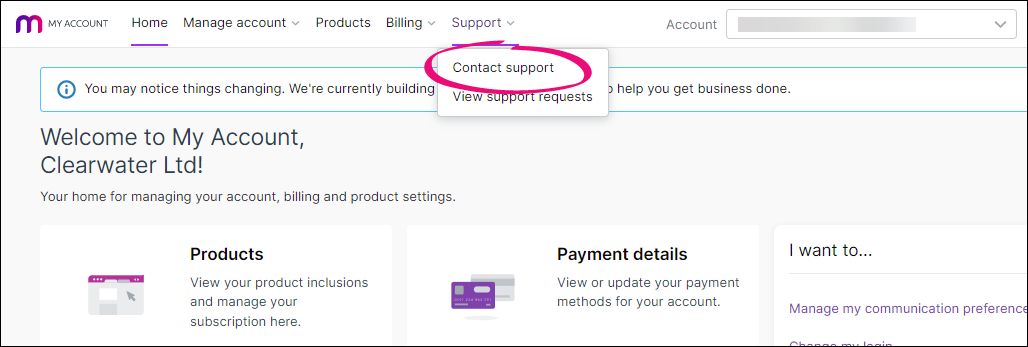
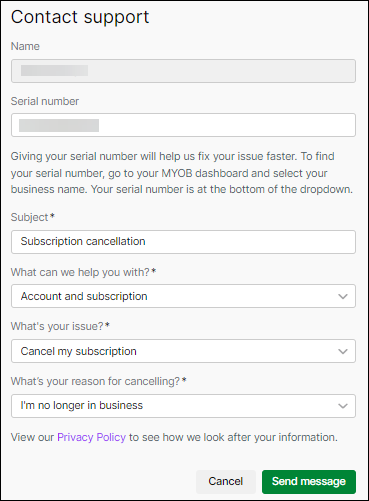
This opens the Contact support page, with your name pre-filled from your account details. - In the Serial number field, enter the serial number of the subscription or product you need support for.
- In the Subject field, describe the request. To help us complete the cancellation, include your company file name or Company File ID (you'll find this in AccountRight via the Help menu > About MYOB AccountRight).
- In the What can we help you with? field, choose Account and subscription.
-
In the What's your issue? field, choose Cancel my subscription.
- In the What's your reason for cancelling? field, choose a reason.
- When you’re finished, click Send message.
- Including in their request I the description they note the name of the file and company file ID this will reduce support cancelling wrong files
If you're an MYOB Partner, you’ll need to request your cancellation by submitting a support request online through MYOB Practice. Once you've done this, you'll get a confirmation email, and we'll get back to you with a response as soon as we can.
FAQs
Comments
0 comments
Please sign in to leave a comment.